Blog

Share AI Event Templates With Clients — Without Leaving Your Portal

Photo booth owners can use TalleFlow's AI Template Picker to share AI event templates inside brochures and questionnaires—clients choose designs in the client portal and selections sync to your responses.

Explore more blogs
Product Updates
5 mins

Share AI Event Templates With Clients — Without Leaving Your Portal

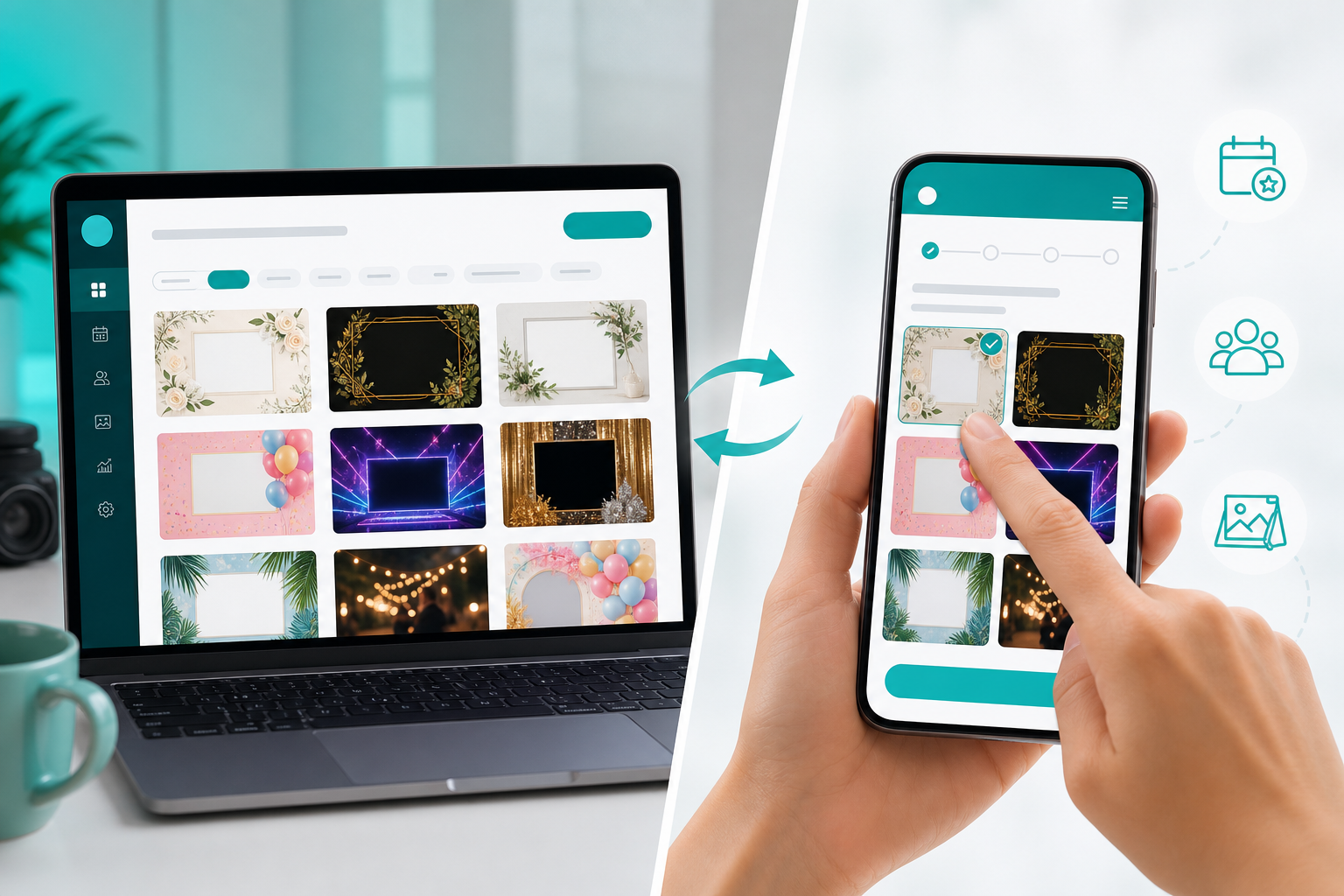
The AI Template Picker in TalleFlow lets photo booth owners share curated AI event templates inside brochures and questionnaires, so clients choose designs in the client portal and their selections flow straight into your form responses—without sending people to a separate store.

You sent the brochure. The client is interested. Then comes the awkward part: “Here’s a link to browse our AI templates — pick what you like and let me know.”

That handoff slows everything down. Links get buried. Choices come back scattered across email or DMs. And you’re left matching “the one with the gold frame” to an actual product before you can quote or fulfill.

Today, that workflow gets a lot cleaner inside TalleFlow.

What’s new: an AI Template Picker built into your client documents

We’ve released an AI Template Picker that lets photo booth owners share curated AI event templates directly inside the brochures and questionnaires you already send through the client portal.

Instead of sending clients somewhere else, they browse options, select what fits their event, and submit — all in the same experience where they review packages, answer intake questions, and move the booking forward.

The template catalog comes from Ryan Salinas’s digital studio. You choose what to offer; your clients choose what they want for their event.

Why photo booth owners are using it

Upsell at the moment of highest intent
When a client is already reviewing your brochure after an inquiry, that’s the best time to show add-on templates — not three days later in a follow-up email.

One workflow, not another tab
Template selection lives inside TalleFlow documents and the client portal. Fewer links. Fewer “did you see my last message?” moments.

Selections you can actually act on
When a client submits, their picks show up in your form responses with the product details you need to follow up — so sales conversations start with clarity.

You stay in control of the menu
You decide which templates your business offers. Your competitor’s catalog isn’t your catalog.

How it works

  1. Turn it on in Settings → Connected Tools (Integrations) and choose which AI templates you want available to clients.
  2. Curate your catalog — search products, filter by tags, and save the selection that fits your brand and packages.
  3. Add the picker to a document in the editor by inserting it into a questionnaire or brochure (alongside your existing content).
  4. Customize per document if you need to — narrow which templates appear in a specific brochure or intake form without changing your global defaults.
  5. Share to the client portal the way you normally would.
  6. Review submissions in TalleFlow responses when clients send their choices back.

Flexible for real client conversations

Not every event needs the same buying experience. The picker supports the details that matter day to day:

  • Single or multiple selection — let a client choose one hero template, or build a shortlist of options for their event.
  • Search and tag filters — keep large catalogs manageable when you’re curating what to show.
  • Per-document customization — tailor which templates appear in a wedding brochure vs. a corporate intake form.
  • Client-friendly browsing in the portal — clients see templates in context, not as a disconnected storefront.

A practical example

A photo booth owner sends a post-inquiry brochure with package tiers and add-ons. Midway through, the client opens the AI Template Picker, selects two styles they love for their reception, and submits.

You see those selections attached to the response in TalleFlow — no screenshot archaeology, no “which link was that again?”

That’s the point: make template upsells part of the client journey, not a detour from it.

Explore the template catalog

Want to see what’s available to curate for your clients? Browse Ryan’s AI event templates here:

👉 Explore AI templates at ryansalinas.com/digital

If you’re already using TalleFlow for brochures, questionnaires, and the client portal, the AI Template Picker is live now — enable it in Connected Tools and add it to your next client-facing document. New to TalleFlow? See plans and get started.

Frequently asked questions

What is the AI Template Picker in TalleFlow?

The AI Template Picker is a built-in block you add to brochures and questionnaires so clients can browse and select AI event templates inside the TalleFlow client portal. Selections are saved with the form response.

Who is the AI Template Picker for?

It’s built for photo booth owners and event creatives who want to share AI template options with clients during the booking process—especially when upselling add-ons inside a brochure after an inquiry.

How do photo booth owners share AI event templates with clients?

Enable the integration under Settings → Connected Tools, choose which templates to offer, add the picker to a brochure or questionnaire in the document editor, then share that document to the client portal as you normally would.

Can clients choose more than one AI template?

Yes. You can configure single-select or multi-select per document, depending on whether you want one final choice or a shortlist of favorites.

Where do client template selections appear after they submit?

Selections appear in your TalleFlow form responses with product details (such as titles and images), so your team can follow up without digging through email threads.

How do I explore templates available to offer my clients?

Browse the catalog at ryansalinas.com/digital, then curate which templates your business makes available inside TalleFlow.

Featured Blogs

Explore trending & Featured blogs and topics
Read All

Share AI Event Templates With Clients — Without Leaving Your Portal

Photo booth owners can use TalleFlow's AI Template Picker to share AI event templates inside brochures and questionnaires—clients choose designs in the client portal and selections sync to your responses.

Product Updates
June 24, 2026
Photo booth owner curating AI event templates for clients in TalleFlow

The AI Template Picker in TalleFlow lets photo booth owners share curated AI event templates inside brochures and questionnaires, so clients choose designs in the client portal and their selections flow straight into your form responses—without sending people to a separate store.

You sent the brochure. The client is interested. Then comes the awkward part: “Here’s a link to browse our AI templates — pick what you like and let me know.”

That handoff slows everything down. Links get buried. Choices come back scattered across email or DMs. And you’re left matching “the one with the gold frame” to an actual product before you can quote or fulfill.

Today, that workflow gets a lot cleaner inside TalleFlow.

What’s new: an AI Template Picker built into your client documents

We’ve released an AI Template Picker that lets photo booth owners share curated AI event templates directly inside the brochures and questionnaires you already send through the client portal.

Instead of sending clients somewhere else, they browse options, select what fits their event, and submit — all in the same experience where they review packages, answer intake questions, and move the booking forward.

The template catalog comes from Ryan Salinas’s digital studio. You choose what to offer; your clients choose what they want for their event.

Why photo booth owners are using it

Upsell at the moment of highest intent
When a client is already reviewing your brochure after an inquiry, that’s the best time to show add-on templates — not three days later in a follow-up email.

One workflow, not another tab
Template selection lives inside TalleFlow documents and the client portal. Fewer links. Fewer “did you see my last message?” moments.

Selections you can actually act on
When a client submits, their picks show up in your form responses with the product details you need to follow up — so sales conversations start with clarity.

You stay in control of the menu
You decide which templates your business offers. Your competitor’s catalog isn’t your catalog.

How it works

  1. Turn it on in Settings → Connected Tools (Integrations) and choose which AI templates you want available to clients.
  2. Curate your catalog — search products, filter by tags, and save the selection that fits your brand and packages.
  3. Add the picker to a document in the editor by inserting it into a questionnaire or brochure (alongside your existing content).
  4. Customize per document if you need to — narrow which templates appear in a specific brochure or intake form without changing your global defaults.
  5. Share to the client portal the way you normally would.
  6. Review submissions in TalleFlow responses when clients send their choices back.

Flexible for real client conversations

Not every event needs the same buying experience. The picker supports the details that matter day to day:

  • Single or multiple selection — let a client choose one hero template, or build a shortlist of options for their event.
  • Search and tag filters — keep large catalogs manageable when you’re curating what to show.
  • Per-document customization — tailor which templates appear in a wedding brochure vs. a corporate intake form.
  • Client-friendly browsing in the portal — clients see templates in context, not as a disconnected storefront.

A practical example

A photo booth owner sends a post-inquiry brochure with package tiers and add-ons. Midway through, the client opens the AI Template Picker, selects two styles they love for their reception, and submits.

You see those selections attached to the response in TalleFlow — no screenshot archaeology, no “which link was that again?”

That’s the point: make template upsells part of the client journey, not a detour from it.

Explore the template catalog

Want to see what’s available to curate for your clients? Browse Ryan’s AI event templates here:

👉 Explore AI templates at ryansalinas.com/digital

If you’re already using TalleFlow for brochures, questionnaires, and the client portal, the AI Template Picker is live now — enable it in Connected Tools and add it to your next client-facing document. New to TalleFlow? See plans and get started.

Frequently asked questions

What is the AI Template Picker in TalleFlow?

The AI Template Picker is a built-in block you add to brochures and questionnaires so clients can browse and select AI event templates inside the TalleFlow client portal. Selections are saved with the form response.

Who is the AI Template Picker for?

It’s built for photo booth owners and event creatives who want to share AI template options with clients during the booking process—especially when upselling add-ons inside a brochure after an inquiry.

How do photo booth owners share AI event templates with clients?

Enable the integration under Settings → Connected Tools, choose which templates to offer, add the picker to a brochure or questionnaire in the document editor, then share that document to the client portal as you normally would.

Can clients choose more than one AI template?

Yes. You can configure single-select or multi-select per document, depending on whether you want one final choice or a shortlist of favorites.

Where do client template selections appear after they submit?

Selections appear in your TalleFlow form responses with product details (such as titles and images), so your team can follow up without digging through email threads.

How do I explore templates available to offer my clients?

Browse the catalog at ryansalinas.com/digital, then curate which templates your business makes available inside TalleFlow.

Related Update

How to Price Your Photo Booth Business (Without Racing to the Bottom)

Why creative businesses fixated on low-price rivals are asking the wrong question entirely — and what the most durable brands do instead.

Learn More
imgimg
Creative Business Growth
4 mins

A Fast Trip to WPPI, and a Bigger Reminder About Why Creatives Need Better Tools

A one-day WPPI trip turned into a high-signal reminder of what makes the photography community powerful: real-time collaboration, honest conversations…

Learn More
imgimg
TalleFlow Updates
6 mins

From vision to product (and a partner): our PBX Las Vegas recap

PBX Las Vegas was a turning point for us: last year we showed up with only a vision, and this year we came back with a live Talleflow product, a growing…

Learn More
imgimg
TalleFlow Updates
2 mins

🎉 Announcing the Winner of Our iPad Pro Community Giveaway

Meet the winner of TalleFlow's iPad Pro Community Giveaway—and thank you to everyone who participated in our creative business community.

Learn More
imgimg
TalleFlow Updates
4 mins

We Just Wrapped Founder University 🎓

After completing Founder University, we gained clarity on what matters most. Community, simplicity, and building TalleFlow with creatives, not just for…

Learn More
imgimg
Industry Trends
5 mins

Ever Seen a Photo That Feels Like It’s Moving Around You? Meet the 3D GIF Trend Taking Over Social Media

The 3D GIF (wigglegram) camera trend is transforming visual storytelling in 2025, helping creators, photographers, and brands make eye-catching, shareable…

Learn More
imgimg
Industry Trends

White-Label Your Way In: The Real Playbook For Breaking Into Photo Booths

White-labeling isn’t a shortcut—it’s borrowed trust at interest; here’s how to price the hidden overhead, guard your brand, and niche + network into…

Learn More
imgimg
Product Updates
5 mins

From Complex Docs to Creative Client Experiences: How Talleflow + Unlayer Puts You in Control

Talleflow and Unlayer let you create and send on brand proposals, contracts and invoices in minutes with smart fields, e signatures and instant payments.

Learn More
imgimg
Creative Business Growth
7 mins

The Event Professional's Playbook: How to Break Into the Industry and Land Your First Clients

So you want to become an event planner. You've watched enough weddings, corporate galas, and birthday parties to know you could crush this. You've got the…

Learn More
imgimg
TalleFlow Updates
5 mins

Keep Your Canva Designs Organized: Talleflow's New Integration

Stop hunting for client designs—Talleflow's new Canva integration lets you link designs directly to projects, so when a client asks "where's that design…

Learn More
imgimg
Industry Trends

How Event Vendors Can Stop Chasing Bad Leads and Book Better Clients

Event pros face the same 6 problems: junk leads, dead winters, weak networks, and clunky tools. Here's what actually works to fix them (with data to prove…

Learn More
imgimg
Product Updates
5 mins

Bring Floor Plans to Life Inside Your Client Workspace: TalleFlow × Prismm

TalleFlow × Prismm brings floor plans into your project. View plans in a dedicated tab, add them to proposals, and move clients to “yes” faster.

Learn More
imgimg
CRM & Client Management
5 Mins Read

Why We Keep Showing Up: Lessons from the Forum Ventures AI GTM Event

At TalleFlow, we show up to grow. Here's what we learned at Forum Ventures’ AI GTM event about staying human in an AI-first world—and why connection…

Learn More
imgimg
TalleFlow Updates
3 Mins Read

💡 From Conversation to Feature: Expense Tracking is Now in TalleFlow

Track business expenses directly inside TalleFlow. Our new Expense Page lets you log, categorize, and link costs to projects—built from real user feedback.

Learn More
imgimg
3 Mins Read

You Asked, We Built It: Duplicating Projects in TalleFlow

Duplicate projects in TalleFlow to reuse timelines, tasks, and templates—without starting from scratch. A beta user request became one of our most-used…

Learn More
imgimg
CRM & Client Management
5 Mins Read

Why Traditional CRMs Fail Creative Service Businesses (& How We’re Fixing It)

Generic CRMs weren't built for creative workflows. See why TalleFlow fits event pros, photographers, and service businesses better than traditional tools.

Learn More
imgimg

FAQs about what's included in TalleFlow.

Here are some common questions that you might have about our product and how it works.

Learn more
I'm using multiple apps to run my business. How is TalleFlow different?

TalleFlow was built to solve that. Instead of disconnected apps, it brings together client management, workflow automation, online proposals, invoicing, scheduling, and a built-in community—all in one intuitive platform.

Do I need to use every feature to get value?

Not at all. You can start with the tools you need today—like forms or invoices—and grow into others as your business scales.

Can I manage every client Workflow in Talleflow?

Yes. From lead capture to final payment, TalleFlow handles each step—no switching between tools required.

Is Talleflow built for teams or Solo Businesses?

Both. Whether you're a solo creative or a small agency, the features are designed to flex with your workflow.

Does Everything integrates seamlessly in one platform?

Yes. Every feature is connected—from automation to proposals to payments—so you don’t waste time on duplicate work or disconnected tools.

How many email marketing emails can I send out at once?

Right now in TalleFlow you can send a maximum of 400 emails a day using the email marketing tool.

Have Questions?

Should you require further information about our product or its features, don't hesitate to get in touch with us.

Sign up